
Adding a device to EmPower is simple. Any native EmPower enabled device has a unique Device ID available in the Web Interface of the device.

Using the EmPower app click the + icon in the top right of the home screen to add a device.
From here you can either manually type the EmPower client ID or Scan the QR code using your phones camera (you may be prompted the first time to allow camera permissions, accept this to use the QR code scanning feature).
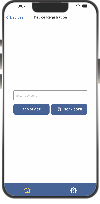
You will now be able to monitor your device with EmPower
Your content goes here. Edit or remove this text inline or in the module Content settings. You can also style every aspect of this content in the module Design settings and even apply custom CSS to this text in the module Advanced settings.
Video Guide


